Customer reviews are valuable insights into their sentiment and help businesses keep an eye on their competitors. Amazon stands out as a huge platform of reviews covering a wide range of products. These reviews are so important for people who try to understand customer opinions and stay ahead in the market.
Collecting Amazon reviews may sound simple, but what if you need to browse hundreds or even thousands of pages to find the information you are looking for? An easy and effective method of obtaining data from a website is to scrape it. Scraping Amazon reviews can help you extract the required data and store it in local storage or a database.
So, why waste time manually sifting through countless reviews when you can gather them at the click of a button? Allow Crawlbase’s Amazon review scraper to make your life easier and your decisions smarter.
We are here to show you how to scrape amazon reviews with Node.js code in a minute! Keep scrolling and find the easiest way to scrape Amazon reviews. Let’s begin, shall we?
How to Scrape Amazon Reviews with Crawlbase & Node.js
This article will demonstrate how to construct an Amazon review scraper using Node.js to take advantage of Crawlbase’s API-based structure. The project efficiently scrapes product reviews from a list of Amazon URLs and saves them directly to a CSV file.
Rather than complicating this process, here is a list of things we need to accomplish.
Set up Crawlbase Account
To use the API, we need this. Your first 1,000 API calls are free. This will allow you to test the service and see if it meets your expectations. You can use the normal token instead of the Javascript token in this case.
List of Amazon URLs to Scrape
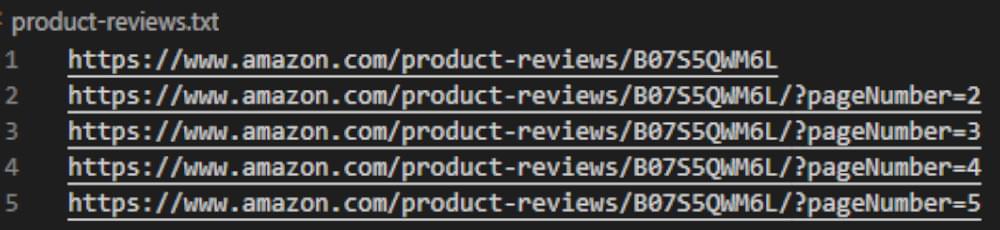
Create a text file with one URL per line of Amazon product review links. This guide will refer to this file as “amazon-products.txt.”
Crawlbase’s NodeJS library
Crawlbase’s website provides free access to its libraries. You can find Node.js under the libraries section once you log in.
Github Node Cheerio Library
Look for cheeriojs/cheerio on Github
Utilizing Node.js Cheerio + Crawlbase
With everything you need for this project in hand, let’s get started. Start your favorite code editor. Use Visual Studio Code, one of Microsoft’s most popular free source-code editors that you can use on most platforms.
To start, we’ll need to install Crawlbase’s dependency-free module and the Cheerio Nodejs library. Enter the following lines in the terminal:
1 | npm i cheerio |
1 | npm i crawlbase |
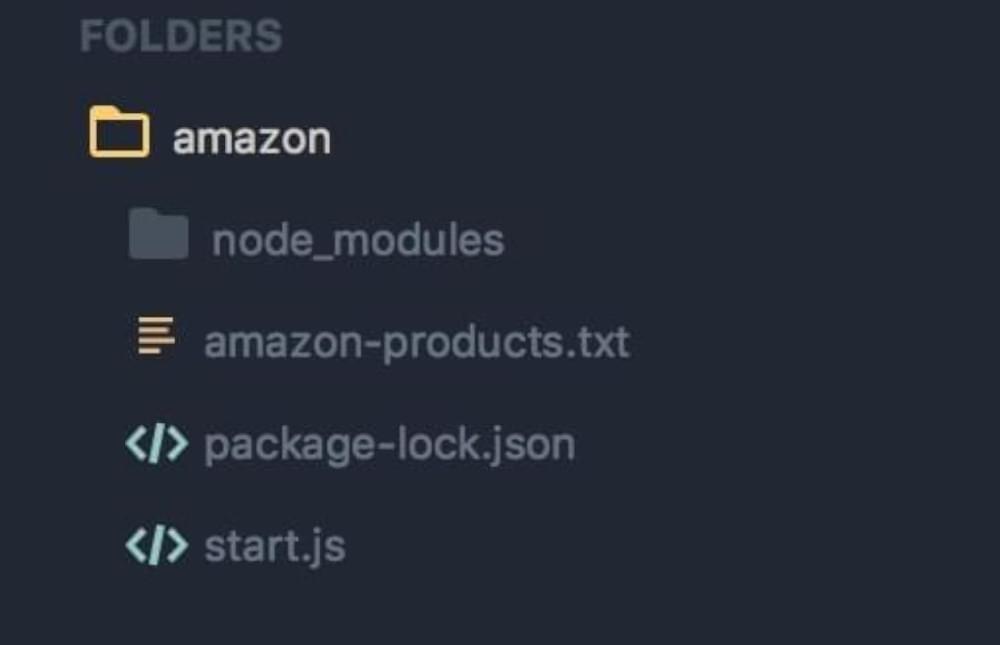
After installing the library, create a project folder and a file AmazonScraper.js inside it. Remember to include the amazon-products.txt file that you created earlier. Here is an example of our project structure:
Identifying constants in the function scope makes our code cleaner and more understandable. Let’s use the Crawlbase node library as the backbone of our scraper, utilizing the Crawling API. We must also use the Node Cheerio library to extract reviews from our URLs’ full HTML code.
1 | const fs = require('fs'); |
Additionally, let us load the text file containing the URLs and the line that will allow us to insert your Crawlbase token.
1 | const file = fs.readFileSync('amazon-products.txt'); |
Now, we must insert a few more lines for the scraper to automatically send the reviews directly into a CSV file since we do not want this to display the results in the console. Fs.createWriteStream() is a function that creates a writable stream containing the path to the file in its parameters.
1 | const writeStream = fs.createWriteStream(‘Reviews.csv’); |
There is an excellent, fast, and flexible implementation of jQuery known as cheerio, which you can use to find out the section of users’ reviews on the Amazon web page, so that you can write these reviews into a CSV file. This function will parse the returned HTML code.
1 | function parseHtml(html) { |
In our final piece of code, we will make use of the scheduling timer setInterval(callback[, delay[, ...args]) method. Node.js uses this construct to call functions after a time period. Node.js script for Amazon review scraping is very simple and easy to understand. Using this method, our scraper can crawl the URLs in our list and scrape them. In this way, we can scrape the API 10 times per second.
1 | const requestsPerSecond = 10; |
Depending on whether you close or terminate the program, the code will run in a loop for a period of time, so add as many URLs as you want into the amazon-products.txt file, and the crawler will run through each URL and add all the users’ reviews in your CSV file that it can find.
It is important to note that the Crawling API will return a response or status code to the crawler each time it requests a specific URL. For pc_status and original_status, a successful request will return the value 200 in the case of a successful response.
The console log should show any errors our code encounters. There are no fees for failed requests with Crawlbase, meaning you will only pay for successful requests towards your API consumption.
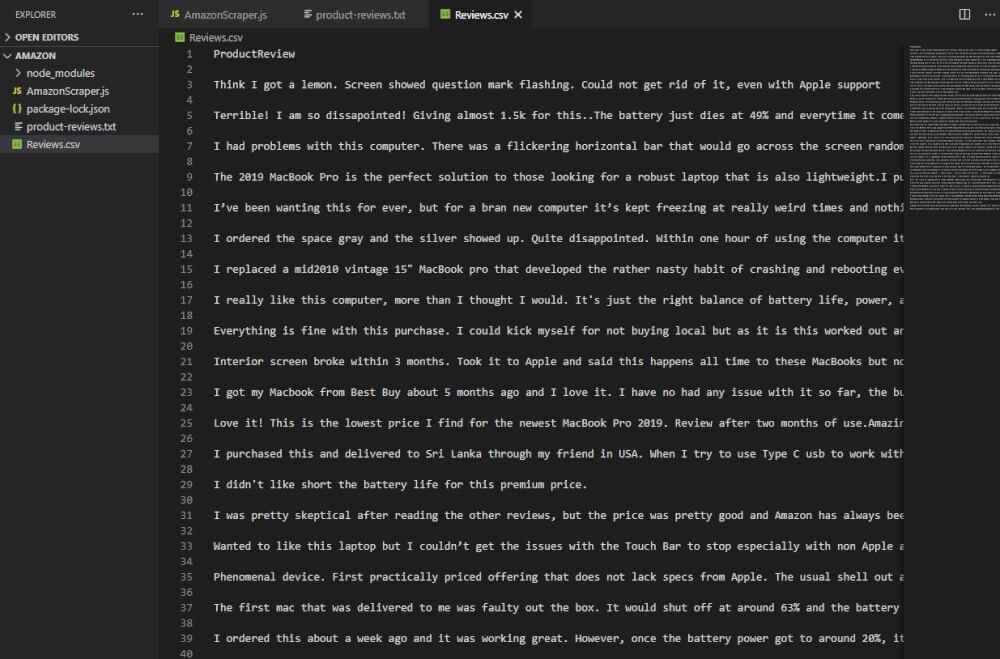
If everything goes according to plan, you will have results that look like this:
Benefits of Scraping Amazon Reviews
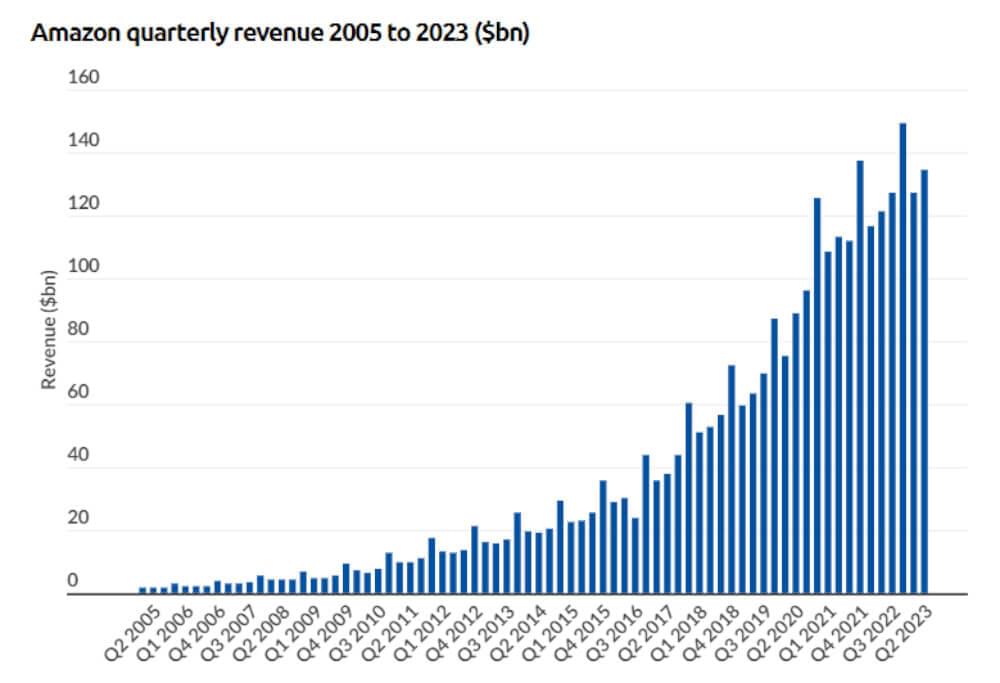
As e-commerce evolves, intelligent and targeted marketing is becoming increasingly important. Most shoppers now shop online, and the same is true for sellers who build portfolios through platforms such as Amazon, Flipkart, eBay, Ali Baba, etc. Did you know that in 2022, Amazon generated $513 billion, solidifying its position as the third-largest company globally in terms of revenue? This marked a 9.1% increase in revenue from 2021.
Amazon sellers machine learning and artificial intelligence significantly predict the next big shopping trend and influence consumer preferences.
E-commerce dealers must use data analytics to optimize their offerings to convert their typical online consumer into a customer. There are a number of benefits you can get from Amazon review scraping:
- Competitor Analysis: It’s a must for your business to understand your competitors. Comparing and monitoring similar products can provide immense data. For Amazon sellers, scraping Amazon reviews for competitor product information can help shape effective marketing strategies, analyze pricing, manage costs, and track ongoing trends.
- Customer Satisfaction Management: When dealing with numerous different reviews, you must ensure customer satisfaction. If you scrape reviews from Amazon, it can simplify the entire process, helping identify areas for product improvement and assess overall customer satisfaction. Moreover, you can get helpful data to enhance the user experience, such as identifying recurring complaints about certain product features.
- Understanding Customer Demands: Anticipating market trends can be challenging, but if you look closely, customer reviews often contain product requests and recommendations. By analyzing these reviews, you can identify new growth areas and stay ahead of the competition. A reliable Amazon review scraper can put you in fourth gear!
- Identifying Highest-Rated Reviews: While scraping customer profiles for lead generation is restricted, Amazon’s top reviewers’ list can be scraped to identify product champions. You can request reviews from these influential reviewers when launching new products.
- Monitoring Online Reputation: Small retailers and online sellers heavily rely on their reputation. Scraping Amazon reviews helps them monitor how customers perceive their products, allowing for reputation management. Using Amazon data for decision-making processes can be facilitated through web scraping.
Is it Legal to Scrape Amazon for Reviews?
You might wonder if scraping data from Amazon is legal. Well, it’s a bit of a mixed bag. The legality depends on what you’re scraping, how you’re doing it, and what you do with the data. But generally, scraping data that’s already public, like reviews, is okay.
Now, Amazon has some anti-scraping techniques. But there are tools, like Crawlbase, that help you scrape Amazon reviews without getting into trouble. It’s like a no-code tool that makes Amazon review scraping easier and less likely to get blocked.
Best Tool to Scrape Amazon Reviews
Crawlbase is the best web scraping tool for automation features, user interface design, cost, and automation features. Regarding Amazon review scrapers, Crawlbase is a perfect option because it has a starting price of $29 a month and is cloud-based, meaning you don’t have to download anything to your computer to use it.
It is important to note that Crawlbase is one of the largest Amazon scraper on the market, and with its tools, you’ll be able to access a whole lot more than just Amazon product reviews. As a scraping provider, they have a wide variety of products that are tailor-made specifically for businesses looking to scrape content from the web and would like to ensure that their data is safe and protected. You can easily scrape Amazon product reviews with Node.js and Crawlbase.
With its features, you’ll also be able to access all publicly available data about a particular product on Amazon. As it is extremely easy to use, we think it would be a great option for anyone just starting with their web scraping needs and looking for a quick, easy, reliable option.
Why Use Crawlbase to Scrape Amazon Reviews?
The first step before you can start getting Amazon reviews is building a scraper, and there are various ways to do it. If you are not a programmer, however, do not worry. You have a product you can use for whatever needs you may have regarding web scraping. Amazon review scraping using Node.js is really simple, and you can easily use Crawlbase’s API as the foundation for a scraping tool.
It will be easier to scrape Amazon reviews using the Crawling API and help protect web crawlers against blocked requests, proxy failures, CAPTCHAs, etc. Efficient. Thousands of datacenter and residential proxies worldwide are also integrated into Crawlbase’s products, ensuring the best data results on the market.
Conclusion
The code is ready, and once it runs, you can easily scrape 10 Amazon reviews simultaneously. For this post, we’re logging the results in the console, but you can replace the console.log with anything you wish. You can save it in a database, file, etc. It’s up to you.
The World Wide Web makes data accessible anytime, anywhere. Crawlbase makes it easy to build a web scraper, which is one of the best tools to farm data. This scraper will work with any Amazon URL containing a product review and save it to your CSV file. Alternatively, you can extract product prices and availability from the Cheerio library.
You can use a scraper on any website, not just Amazon. With Crawlbase’s flexibility, users can make it work with the most popular programming languages today. The API structure makes integration easy.
We hope you enjoyed this Node.js tutorial for Amazon review scraping and understand how to use Node.js for scraping Amazon reviews. Look forward to seeing you soon in our Crawlbase community. Have fun crawling! 😄